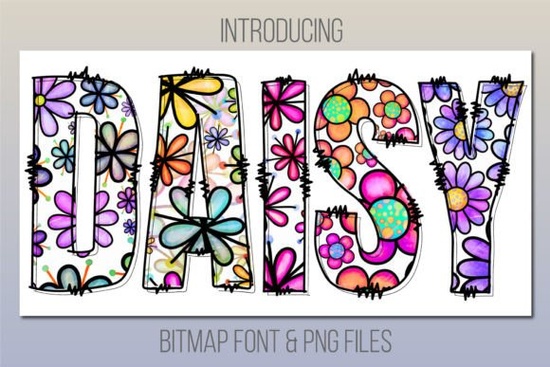
If you're looking for a cheerful, eye-catching typeface that adds instant personality to your projects, the Daisy Font might be just what you need. Designed with a playful spirit and colorful charm, this font brings a handcrafted daisy print look to headlines, greeting cards, kids’ apparel, party invites, and more. It’s especially handy if you’re creating designs that call for warmth, whimsy, or a touch of springtime joy.
What makes Daisy stand out is that it’s a color font meaning each letter includes embedded color and texture, not just an outline. This gives your text depth and visual interest without needing extra layers or effects. But keep in mind: because it’s a bitmap-based color font, it only works in specific software. You’ll need Photoshop CC 2017 or newer, Illustrator CC 2018+, InDesign CC 2019+, or native macOS apps like Pages, Keynote, or Font Book. Unfortunately, it won’t work in Cricut Design Space but don’t worry, the product includes bonus PNG files you can use anywhere.
Who is the Daisy Font best for?
This font shines in projects where friendliness and approachability matter. Think:
- Print-on-demand sellers designing mugs, T-shirts, or tote bags with uplifting messages
- Small business owners creating social media graphics or packaging for kid-friendly products
- Teachers and parents making classroom decor, birthday banners, or personalized name tags
- Crafters working on scrapbooking, card making, or DIY party supplies
If your audience includes children or you’re aiming for a lighthearted aesthetic, Daisy pairs beautifully with other fun options like the Kids Name Font collection, which offers similar vibrancy with name-specific customization.
How to use Daisy Font if your software isn’t supported
Not everyone uses Adobe Creative Cloud or a Mac and that’s okay. The Daisy Font download includes high-resolution PNG files for every character. You can drag and drop these into Canva, Procreate, Silhouette Studio, or even Microsoft Word. Just arrange the letters manually like digital stickers. It takes a bit more time, but the result still captures that cheerful daisy-print look.
For those who do have compatible software, installing the font is straightforward. Once activated, you can type normally, resize freely (within reason remember, it’s bitmap-based, so extreme scaling may reduce quality), and even change the background color behind the text for contrast.
Styling tips for authentic, balanced designs
Because Daisy Font already carries strong visual weight with its built-in colors and floral texture, less is often more:
- Pair it with simple sans-serif fonts for body text think Helvetica, Arial, or Montserrat
- Avoid adding heavy shadows, glows, or outlines; the font stands well on its own
- Use it for short phrases: names, titles, slogans, or single words like “Hello,” “Joy,” or “Party!”
- Stick to light or neutral backgrounds so the daisy details stay visible
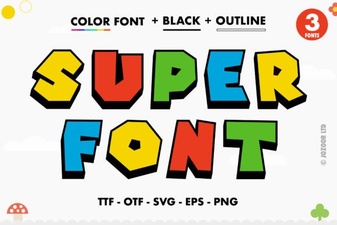
If you enjoy Daisy’s vibe but want something bolder or more geometric, you might also explore the Super Font series, which offers chunky, energetic alternatives in full color.
And if you’re browsing Creative Fabrica for similar styles, you can check out the full range by searching for Daisy Font directly on their site.
Before you buy: compatibility checklist
To avoid frustration, confirm your setup first:
- Do you use Photoshop CC 2017+, Illustrator CC 2018+, or InDesign CC 2019+? → Great! Install and use as a live font.
- Are you on a Mac using Pages, Keynote, or Font Book? → You’re covered.
- Do you rely on Cricut Design Space, older Adobe versions, or Windows-only apps? → Use the included PNGs instead.
- Need editable vector color? This isn’t an SVG font so resizing beyond ~200% may soften details.
If your workflow matches any of the supported tools or if you’re happy using PNGs you’ll get plenty of creative mileage from this cheerful typeface. For more inspiration, see how others have used it in the Daisy Font showcase, where real users share their greeting cards, nursery signs, and summer-themed merch.
Next step: Before downloading, open your design software and test a free color font (many are available) to confirm your system handles them smoothly. That way, Daisy Font will be ready to bloom in your next project without surprises.
Get Started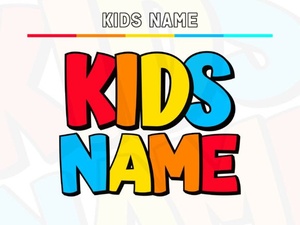 Creative Font Ideas for Kids Names & Projects
 Discovering Creative Uses for the Super Font
 Cultivo Font: Modern Sans-Serif Design Projects
 Aureline Font: Creativity for Modern Designs
 Vintage Varsity Fonts for Sporty Design Projects
 Hey Magnolia Font: Design Inspiration & Creative Projects